AI tool

AI Image Upscaler for Creative Assets

Improve image resolution and prepare sharper visuals for campaigns, product pages, presentations, mockups and creative projects inside supported Keter Labs workflows.

ai image upscalerimage upscalerai photo enhancerupscale imageimage enhancement toolcreative image upscalingproduct image upscalercampaign image upscalerimage quality improvement
AI Image Upscaler for Creative Assets — Keter Labs
Edit

What's included

What this section gives you.

Upscale Images for Campaign Assets

Upscale Images for Campaign Assets

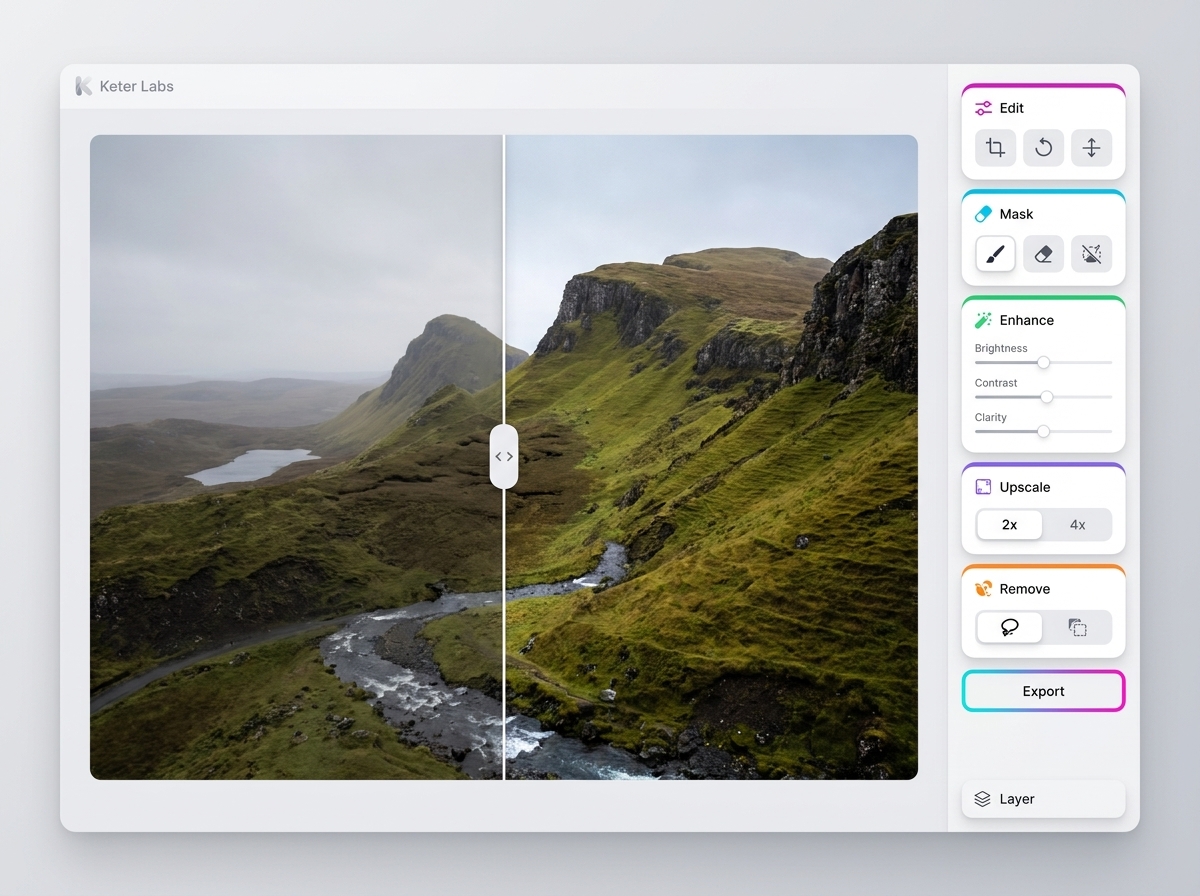
Use Keter Labs AI image upscaler to improve visual resolution for campaign images, product visuals, presentation graphics and mockup assets where supported by the workflow.

Refine Generated, Stock and Uploaded Images

Refine Generated, Stock and Uploaded Images

Bring AI-generated visuals, stock images or uploaded creative assets into an upscaling workflow so promising images can move closer to review, design or publishing use.

Keep Upscaling Connected to Production

Keep Upscaling Connected to Production

Upscaling works best when it stays connected to the brief, reference assets, design direction and next creative step instead of becoming a separate one-off file task.

When to use it

Common jobs this section is built for.

These examples make it easier to choose where to start and which nearby section to open next.

Fast first draft

Fast first draft

Use AI image upscaler when the team needs a concrete direction quickly and wants to review something visual, not just discuss a brief.

Production cleanup

Production cleanup

The workflow helps turn a promising result into something cleaner, correctly sized, and easier to hand off.

Team alignment

Team alignment

The page explains the task in a way that marketers, designers, producers, and founders can discuss together.

Details

What to know before you use it.

What Is an AI Image Upscaler?

What Is an AI Image Upscaler?

An AI image upscaler helps enlarge or improve an image so it can be easier to use in campaign, product, presentation and design workflows. Keter Labs positions image upscaling as part of a connected creative process, so teams can refine visuals and continue into editing, mockups or asset management where available.

How the Image Upscaling Workflow Fits Creative Production

How the Image Upscaling Workflow Fits Creative Production

Start with the image you want to improve, check the target use, upscale the asset inside the supported workflow, then review sharpness, edges, text clarity, brand fit and layout quality before using it in a campaign or presentation.

Quality Checks Before You Use an Upscaled Image

Quality Checks Before You Use an Upscaled Image

Review the final image for artifacts, unrealistic details, distorted text, edge issues, faces, product accuracy and format fit. If the result needs more work, continue with editing, design or mockup workflows instead of treating the first upscale as final.

Workflow

How it works inside Keter Labs.

Every section in Keter Labs follows the same shape: a clear brief, a fast first draft, refinement in the editor, and a result saved into the project.

AI Image Upscaler for Creative Assets workflow
1

Step 1

Clarify the task for AI image upscaler: the audience, format, source material, and quality bar.

2

Step 2

Prepare references, brand constraints, output size, and any files that should guide the result.

3

Step 3

Run the tool or workflow, compare versions, and keep the strongest direction inside the project.

4

Step 4

Review rights, visual quality, export format, and the next step before handing the asset to a team or campaign.

FAQ

Frequently asked questions

What is an AI image upscaler?+

An AI image upscaler is a tool that helps enlarge or improve an image so it can be more useful for creative production, presentations, product visuals and campaign assets.

Who is Keter Labs AI image upscaler for?+

It is useful for creators, marketers, agencies, designers and teams that need sharper visuals for campaigns, product pages, mockups, presentations and creative reviews.

What images can I upscale with Keter Labs?+

Where supported, users can work with generated visuals, stock assets, uploaded images, product visuals, mockup materials and presentation graphics inside Keter Labs workflows.

How does image upscaling fit into a creative workflow?+

Image upscaling helps refine a promising visual before it moves into editing, mockups, presentation layouts, campaign assets or final review inside the broader creative workflow.

What should I check after upscaling an image?+

Check sharpness, edges, faces, product details, text, artifacts, brand fit and whether the image still works for the intended campaign, layout or presentation.

Ready when you are

Bring this workflow into your next project.

Spin up assets, lock in versions and align your team around a single creative platform.

Create account