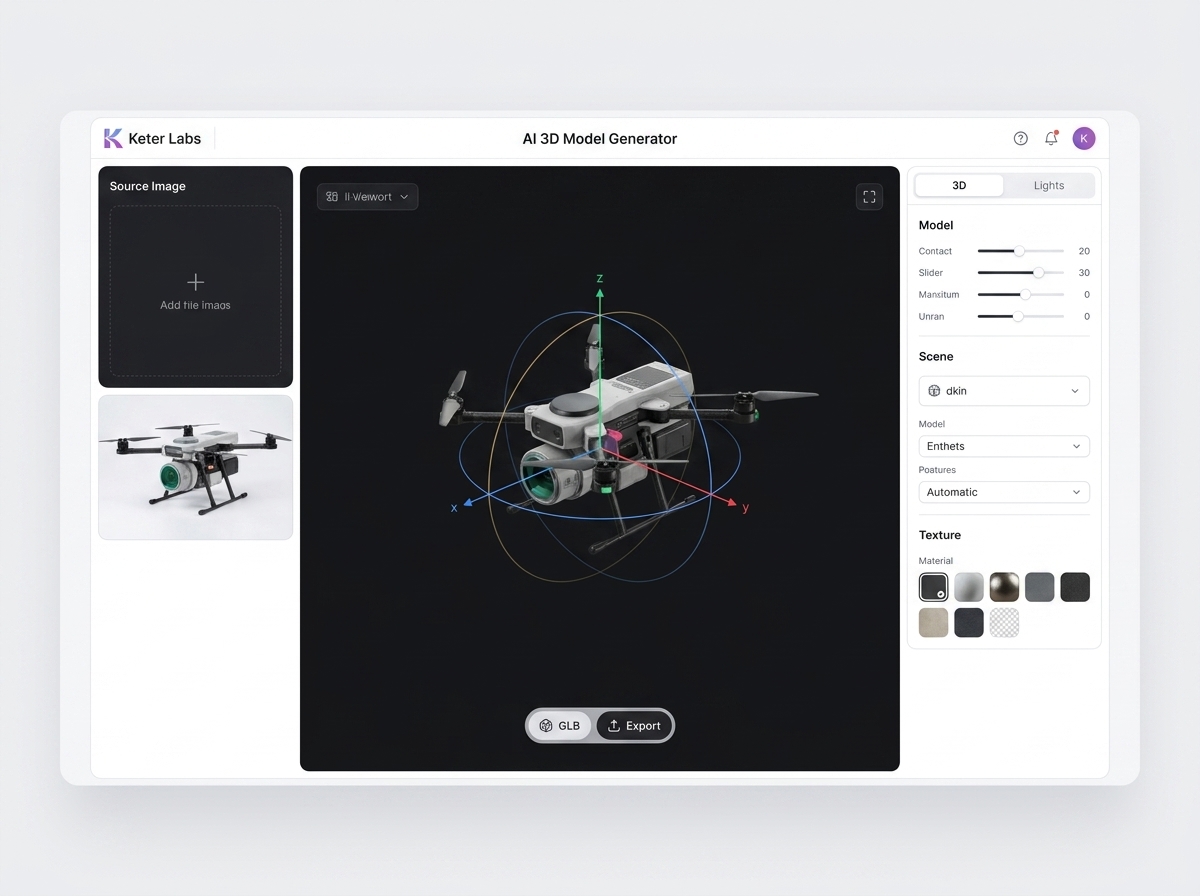
AI 3D model generator

AI 3D Model Generator for Product and Creative Concepts

Generate 3D model concepts for product visuals, campaign ideas, presentations, creative exploration and design workflows inside Keter Labs.

AI 3D model generator3D model generator AI3D model AI generatorAI 3D generatorAI 3D model makerAI 3D asset generatorAI 3D object generatorgenerate 3D models with AIAI 3D model concepts3D model generation workflow3D assets for creative projects3D model concepts for products3D visuals for campaigns3D concepts for presentations3D object concepts for design teamsAI 3D models for product visuals
AI 3D Model Generator for Product and Creative Concepts — Keter Labs
3D

3D generation workflow

AI 3D model generation for creative production

Create 3D model concepts from prompts

Create 3D model concepts from prompts

Keter Labs 3D Model Generator helps teams create 3D model concepts from prompts, briefs, references or images for product visuals, campaign concepts, presentations and creative projects. Teams can explore dimensional asset ideas, review generated results and continue working across supported Keter Labs design, mockup, stock and creative workflows.

Explore product and campaign asset directions

Explore product and campaign asset directions

Use 3D model AI generator workflows to explore product visuals, campaign ideas, presentation concepts, product page graphics and social or ad creative directions while keeping the page focused on creative 3D concept generation.

Keep 3D work connected to production

Keep 3D work connected to production

Keter Labs helps teams move selected 3D concepts into supported design, mockup, stock, template and creative review workflows while checking visual quality, placement context and current plan details before use.

Use cases

3D model generation use cases for marketing and design teams

Use AI 3D generation when a team needs dimensional concept directions for product visuals, campaign assets, presentations, creative exploration, product pages, social graphics, mockup support, design direction or client review.

Product 3D concept visuals

Product 3D concept visuals

Create AI 3D model concepts for product visuals when the team needs a dimensional direction to review before building campaign, presentation or product page assets.

Campaign 3D asset ideas

Campaign 3D asset ideas

Use an AI 3D asset generator workflow to explore object directions, dimensional compositions and 3D visuals for campaigns before moving into design or review.

Presentation visuals

Presentation visuals

Generate 3D concepts for presentations when a pitch, internal deck or client review needs more dimensional visual ideas than a flat placeholder can provide.

Creative concept exploration

Creative concept exploration

Use AI 3D model concepts to test object forms, visual directions and dimensional ideas before a campaign, product story or design route is fully decided.

Product page visuals

Product page visuals

Explore AI 3D models for product visuals when ecommerce, SaaS, hardware or digital product pages need stronger visual concepts for sections and feature explanations.

Social and ad creative concepts

Social and ad creative concepts

Generate 3D object concepts for design teams working on social graphics, ad variations, campaign teasers or launch visuals that need dimensional impact.

Mockup-supporting 3D concepts

Mockup-supporting 3D concepts

Use 3D concept generation before or alongside mockup workflows when a product, package or object idea needs a stronger visual direction for review.

Design direction exploration

Design direction exploration

Support early design direction with dimensional asset ideas that can guide layouts, campaign visuals, presentations and wider creative production decisions.

Client review concepts

Client review concepts

Prepare 3D concept directions for client review when stakeholders need to compare visual options before a selected route moves further into production.

Workflow decisions

Choose the right 3D, mockup and visual workflow

AI 3D model generator vs stock 3D assets

AI 3D model generator vs stock 3D assets

An AI 3D model generator and a stock 3D asset library solve different tasks. A 3D model generator helps teams create new 3D concepts from prompts, briefs or references, while stock assets help teams browse existing ready-made visual assets. Teams can use generation when they need a new direction and use stock workflows when they need existing assets.
AI 3D model generator vs AI mockup generator

AI 3D model generator vs AI mockup generator

An AI 3D model generator focuses on creating 3D model concepts or 3D-style asset ideas, while an AI mockup generator focuses on placing products, packaging, interfaces or campaign visuals into presentation-ready scenes. Teams should choose the workflow that matches the asset they need.

AI 3D model generator vs AI image generator

AI 3D model generator vs AI image generator

An AI image generator creates broader 2D visuals such as product scenes, campaign images and creative concepts. An AI 3D model generator focuses on dimensional model concepts and 3D-style assets. Teams should choose the workflow based on whether they need a flat visual concept or a 3D-style asset direction.

Review generated 3D concepts before publishing

Review generated 3D concepts before publishing

Generated 3D model concepts should be reviewed before public, paid, client-facing or campaign use. Teams should check subject accuracy, shape consistency, visual quality, brand fit, proportions, placement context and usage requirements before treating any generated 3D asset as final.

Workflow

How to generate 3D model concepts in a creative workflow

Start with the 3D model concept, generate dimensional asset directions from a prompt, brief or reference, then review quality, proportions, placement context and usage requirements before publishing or sharing.

AI 3D Model Generator for Product and Creative Concepts workflow
1

Step 1

Describe the 3D model concept, including the object, subject, style direction, intended placement and how the concept will support the creative project.

2

Step 2

Generate 3D asset directions from a prompt, brief, reference or image while keeping the product, campaign, presentation or review context in mind.

3

Step 3

Review and reuse selected results, then continue into supported design, mockup, stock, template or broader creative workflows where appropriate.

4

Step 4

Check subject accuracy, shape consistency, visual quality, brand fit, proportions, placement context, usage requirements and current plan details before publishing or sharing.

FAQ

AI 3D model generator FAQs

What is an AI 3D model generator?+

An AI 3D model generator helps teams create 3D model concepts or 3D-style assets from prompts, briefs, references or images for product visuals, campaign ideas, presentations and creative projects.

What can I use Keter Labs 3D Model Generator for?+

Keter Labs 3D Model Generator can support workflows for product 3D concepts, campaign asset ideas, presentation visuals, product page visuals, mockup-supporting concepts, design exploration and client review assets.

Is an AI 3D model generator the same as a stock 3D asset library?+

No. An AI 3D model generator creates new 3D concepts from prompts, briefs or references, while a stock 3D asset library helps teams browse existing ready-made visual assets.

Is an AI 3D model generator the same as an AI mockup generator?+

No. A 3D model generator focuses on 3D model concepts or 3D-style asset ideas, while a mockup generator focuses on placing products, packaging, interfaces or campaign visuals into presentation-ready scenes.

Is an AI 3D model generator the same as an AI image generator?+

No. An AI image generator creates broader 2D visuals, while an AI 3D model generator focuses on dimensional model concepts and 3D-style asset directions.

Should I review AI-generated 3D models before publishing?+

Yes. Teams should review generated 3D concepts for subject accuracy, shape consistency, visual quality, brand fit, proportions, placement context and usage requirements before using them in public or client-facing work.

Next step

Generate 3D concepts for creative projects

Use Keter Labs 3D Model Generator when a creative brief needs dimensional concept directions for product visuals, campaigns, presentations, mockups, social graphics or client review.

Create account